Where your data lives
A clear picture of where your conversations, keys, and files are kept.
Updated August 2, 20261 min read
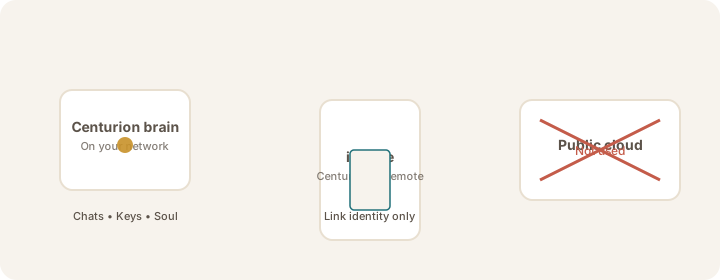
On your Sovereign brain
- Conversation history and missions
- API keys for thinking services
- Your Sovereign's Soul and configuration
- Memory Horizon — how lasting knowledge is organised (see below)
Memory Horizon (on the brain)
Your Sovereign does not keep one opaque “memory blob in the cloud.” It uses three local layers:
- Hot Cache — a short card of essentials loaded every session
- Session Recall — full past chats, searched when needed
- Vault (optional) — sealed long-horizon archive; off until you enable and unlock it
Details: Memory Horizon & Vault.
On your iPhone
- Device link identity (so your brain recognizes this phone)
- A local cache for the app — not the full history
- Remote orients Collaborations and Mission; the brain remains the store
Not required for Crypto Chat
- No public cloud account for the private link / Crypto Chat
- No Mac or Windows Brain installer yet (Linux Brain is available via Account → Get Brain; Windows and Apple are coming soon)
Website Account (separate)
Signing in at 1human1ai.com with a magic link is only for downloads and license paperwork. That Account is not where Crypto Chat lives. See Sign in to your Account and Where your data lives — conversations and keys stay on the brain.
Note
When your brain uses a thinking service, only the question needed for that reply may travel to the provider. See Privacy & Trust overview.
Was this article helpful?